
How to Register & Log In to the SM999 Game
Logging in to the SM999 Game is easy for people who already have an account. You do not need to do many things. You only need your registered mobile number and password.
In this post, we will explain the login process in very easy words. You can follow each step one by one.
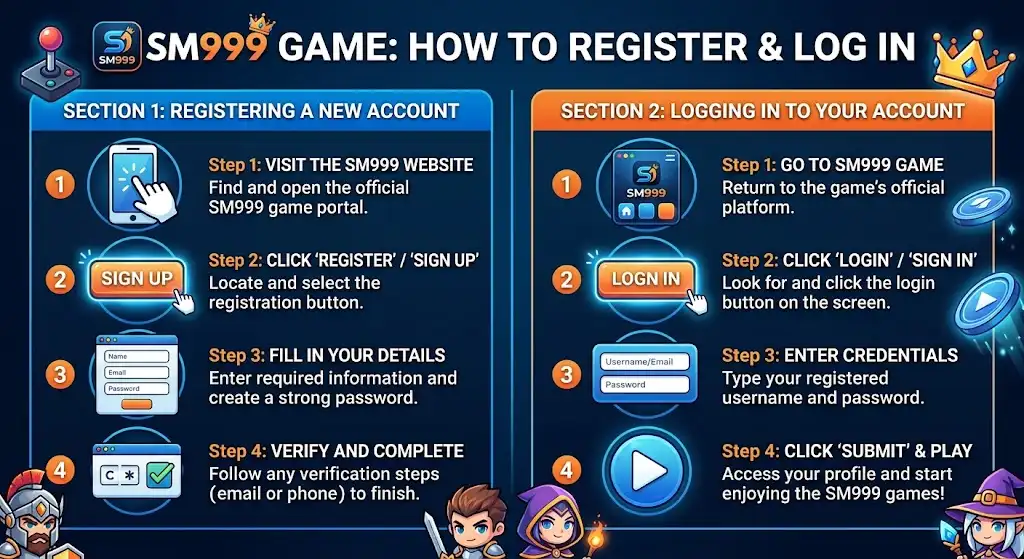
Simple Process to Register & Log In
Open the SM999 website or App
First, open the SM999 website or app on your mobile phone. Make sure your internet is working. If your internet is slow, the website may take more time to open. When the home page appears, look for the Login button.
Click on the Login button
Now, find the login button on the home page. Tap on it. A new login page will open. This page will ask for some information about your account.
Enter Your Mobile Number
On the login page, you will see a box for your mobile number. Enter the mobile number that you used when you created your SM999 account. Type the number slowly and check it again. If you enter the wrong number, you may not be able to open your account.
Enter Your Password
After entering your mobile number, you need to add your password. Type the same password that you created during registration. Be careful while typing. If one letter or number is wrong, the password may not work.
Press the Login Button.
Now check your mobile number and password one more time. If everything is correct, press the Login button. Your account should open after the details are accepted. You can then see your account page and the features available to you.
Why Do You Need to Login?
Before you start the login process, keep these things ready:
Requirements before Login
- A registered SM999 account
- Your mobile number
- Your account password
- A working internet connection
- The SM999 website or app
- Having these things ready can make the login process quick and simple
Forgot Your SM999 Password?
It is normal to forget a password sometimes. If you cannot remember your SM999 password, check the login page for the Forgot Password option.
You can follow these basic points:
- Open the SM999 login page.
- Tap Forgot Password.
- Enter your registered mobile number.
- Follow the instructions on the screen.
- Set a new password if the option is provided.
- Return to the login page.
- Try to log in again.
Common SM999 Login Problems
Sometimes the login process may not work. This can happen for a few simple reasons.
1. Wrong Mobile Number
- Check the mobile number you entered. It should be the same number connected to your SM999 account.
2. Wrong Password
- Check your password again. Make sure you have typed all letters and numbers correctly.
3. The Internet Is Not Working
- A weak internet connection can cause problems. Check your Wi-Fi or mobile data and try again when the connection is better.
4. App or Website Is Not Loading
- If the page does not open, close the app or browser and try again. You can also check whether your app needs an update.
5. Account Locked
- Contact customer support for assistance.
How to Keep Your Account Safe
Your account details are private, so you should keep them safe.
Look at some easy safety tips:
- Never tell your password to anyone.
- Do not share your account details with strangers.
- Use a password that is hard for others to guess.
- Avoid logging in on public phones or computers.
- Always check that you are using the correct SM999 platform.
- Log out when using a shared device.
What Can You See After Login?
After you successfully log in, you can open your account dashboard.
Depending on the platform, you may find features such as
- Your account information
- Available games
- Game history
- Account settings
- Deposit options
- Withdrawal options
- Promotions or rewards, if available
The features may be different for different accounts or may change over time.
Easy SM999 Login Steps
If you want to remember the process, just follow these simple steps:
Open SM999 → Tap Login → Enter Mobile Number → Enter Password → Tap Login
These are the main steps you need to follow.
Final Look
Logging in to the SM999 Game is a simple process. First, open the SM999 website or app and press the Login button. Then enter your registered mobile number and password. Before pressing Login, check your details carefully. If you forget your password, use the password recovery option if it is available.
A good internet connection can also help the login page open properly. Most importantly, keep your password and account information private. With these simple steps, you can understand how to log in to your SM999 account without confusion.